
How Multimodal AI Transformed Smartphone Accessibility for the Blind
The integration of advanced computer vision and large language models into everyday smartphones has given visually impaired users unprecedented independence, turning phone cameras into real-time interpreters of the physical world.
By Factlen Editorial Team
- Accessibility Advocates
- Argue that AI tools are life-changing but emphasize they must remain free and accessible, and cannot replace physical inclusive infrastructure.
- Technology Developers
- Focus on the rapid advancement of multimodal AI, pushing the boundaries of what smartphone cameras and on-device processing can achieve.
- Visually Impaired Users
- Value the newfound independence in daily tasks like cooking and reading mail, but note practical limitations in poor lighting or complex environments.
What's not represented
- · Policymakers regulating medical and assistive device standards
- · Urban planners designing physical accessibility infrastructure
Why this matters
For decades, visual impairment meant relying on sighted assistance for basic daily tasks like reading mail or identifying pantry items. The maturation of free, AI-powered smartphone tools has fundamentally shifted this dynamic, granting millions of people a new baseline of personal independence.
Key points
- Multimodal AI has transformed smartphones into real-time visual interpreters for the blind.
- Apps like Be My AI, Seeing AI, and Google Lookout can describe complex scenes and read text instantly.
- AI integration has reduced customer support resolution times for visually impaired users from 12 minutes to 4 minutes.
- The technology is expanding into hands-free wearables like smart glasses.
- Advocates warn that AI tools should supplement, not replace, physical accessibility infrastructure like Braille.
For a sighted person, knowing the color of the shirt they just pulled out of the closet is a trivial detail. For someone who has lived without visual information their entire life, acquiring that knowledge without having to ask another human being is a profound moment of freedom. Over the past three years, the smartphone in the pocket of a visually impaired user has evolved from a device that merely reads digital text aloud into a sophisticated, real-time interpreter of the physical world.[1][7]
The critical leap occurred between 2023 and 2026, driven by the integration of multimodal artificial intelligence—models capable of processing images, text, and audio simultaneously to respond in natural language. While earlier smartphone accessibility features like Apple's VoiceOver and Android's TalkBack successfully opened up mobile computing in the 2010s, they relied entirely on structured digital content. They could read a website, but they could not describe a cluttered desk or a busy street scene.[1][7]
That barrier fell with the widespread deployment of computer vision combined with large language models. Today, these tools deliver 95% to 98% text recognition accuracy and roughly 85% to 92% scene description accuracy in good lighting conditions. They have matured from experimental curiosities into essential daily companions that help users match outfits, shop for groceries, and navigate unfamiliar environments.[1][2]

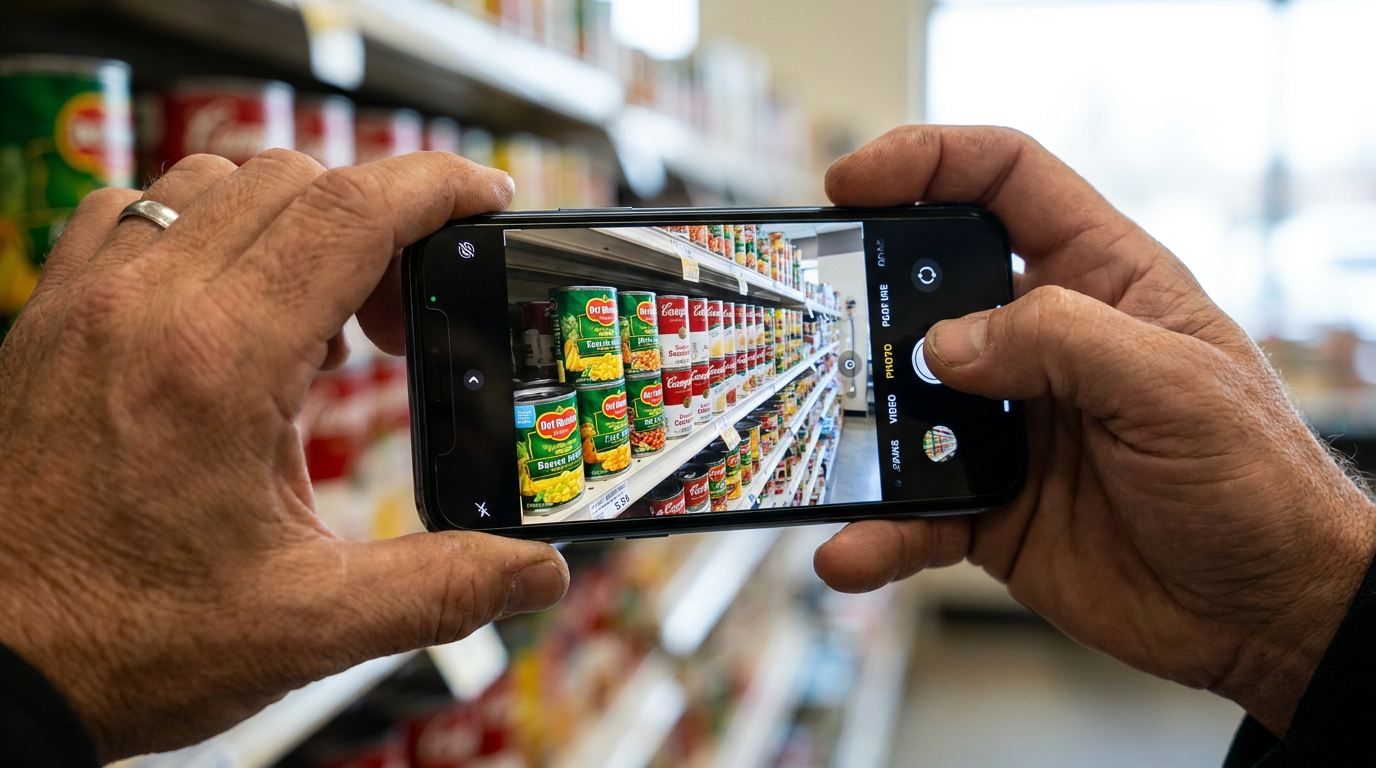
At the forefront of this shift is Be My Eyes, an app originally launched as a volunteer-based video call platform. In 2023, the company partnered with OpenAI to introduce "Be My AI," a virtual assistant built on the GPT-4 vision model. Users can point their phone camera at a restaurant menu or a product label, and the AI delivers a detailed, conversational description instantly.[1][4]
The impact on daily efficiency has been staggering. When Microsoft integrated Be My AI into its Disability Answer Desk to help blind customers with technical support, the AI successfully handled over 90% of issues without human intervention. More importantly, it solved customer issues in an average of four minutes, compared to the 12 minutes typically required by live agents. Only 10% of users chose to escalate their session to a human representative.[4]

More importantly, it solved customer issues in an average of four minutes, compared to the 12 minutes typically required by live agents.
Microsoft has also pioneered its own dedicated application, Seeing AI, which remains a cornerstone for iOS users. Created by a blind Microsoft engineer, the free app features multiple "channels" designed for specific tasks. The Short Text channel instantly reads any text the camera passes over, while the Document channel guides the user with audio cues to capture a full page before reading it aloud. Other channels identify currency, scan barcodes to distinguish between identical-feeling food tins, and even recognize saved faces.[1][5]
For Android users, Google Lookout serves a similar role, deeply integrated with the operating system's native TalkBack screen reader. Lookout operates with minimal friction, offering an Explore mode that continuously scans the environment and announces objects as the camera moves. Because much of its optical character recognition processing is done on the device rather than in the cloud, Lookout remains highly responsive even without an active internet connection.[1][3]
The practical applications of these tools extend deeply into personal independence. Users report using the apps to identify spices while cooking, sort through physical mail privately, and verify expiration dates on perishable goods. In Thailand, brands like Knorr have partnered with Be My Eyes to implement accessible QR codes on packaging, allowing blind consumers to scan products and hear nutritional information and cooking instructions in their native language.[4][5]
The technology is now expanding beyond the smartphone screen and into wearable devices. In early 2026, Be My Eyes launched an integration with Meta's smart glasses, allowing users to trigger visual descriptions hands-free using voice commands. Premium dedicated wearables, such as the Envision AI Smart Glasses and OrCam MyEye, offer even more robust offline capabilities, though their high price tags—often ranging from $3,000 to $4,500—keep them out of reach for many.[1][2][6]

Despite the rapid progress, significant hurdles remain. The most powerful features of free apps still require a stable internet connection, and accuracy can drop sharply in poor lighting or crowded spaces. Furthermore, the global scale of vision impairment is vast; the World Health Organization estimates that 2.2 billion people live with some form of vision impairment, with roughly 43 million completely blind. The vast majority live in low- and middle-income countries where smartphone penetration and internet access are far from universal.[1][7]
Accessibility advocates stress that while AI is a transformative bridge, it is not a replacement for systemic infrastructure. A smartphone app that can read a poorly designed sign does not excuse the lack of Braille signage, nor does an AI navigation tool replace the need for inclusive urban design and tactile paving.[1][7]
Nevertheless, the baseline of what is possible has permanently shifted. For millions of visually impaired individuals, the smartphone has become an indispensable sensory tool. As on-device processing becomes faster and multimodal models grow more sophisticated, the gap between the visual world and the visually impaired user will continue to narrow, one description at a time.[2][7]
How we got here
2010s
Smartphones introduce native screen readers like VoiceOver and TalkBack, granting access to digital text.
2017
Microsoft launches Seeing AI, bringing dedicated optical character recognition and barcode scanning to iOS.
2023
Be My Eyes partners with OpenAI to launch Be My AI, introducing multimodal scene description.
Early 2026
AI accessibility tools begin integrating directly with consumer smart glasses for hands-free use.
Viewpoints in depth
Technology Developers
Focus on the rapid advancement of multimodal AI, pushing the boundaries of what smartphone cameras and on-device processing can achieve.
For software engineers and AI researchers, the smartphone is the ultimate delivery mechanism for assistive technology because of its ubiquity and powerful built-in sensors. Developers emphasize that the leap from simple text-to-speech to multimodal scene description represents a fundamental breakthrough in computer vision. By shifting more processing power directly onto the device, companies like Google and Apple are reducing latency and eliminating the need for constant internet connectivity, making the tools faster and more reliable in real-world conditions.
Accessibility Advocates
Argue that AI tools are life-changing but emphasize they must remain free and accessible, and cannot replace physical inclusive infrastructure.
Advocacy groups celebrate the independence these apps provide but caution against viewing software as a cure-all for societal inaccessibility. They point out that a smartphone app capable of reading a poorly designed sign does not excuse a city from installing Braille or tactile paving. Furthermore, advocates are highly focused on the digital divide; while free apps are democratizing access, premium wearable hardware remains prohibitively expensive, and millions of visually impaired individuals in developing nations still lack access to the basic smartphones required to run the software.
Visually Impaired Users
Value the newfound independence in daily tasks like cooking and reading mail, but note practical limitations in poor lighting or complex environments.
For the daily user, the conversation is entirely practical. The ability to sort physical mail privately, identify the correct spice jar while cooking, or verify the color of a piece of clothing without asking for human help provides a profound psychological boost. However, users are also the first to encounter the technology's edge cases. They note that AI can hallucinate details in complex environments, struggle in dim lighting, and sometimes fail to capture the necessary context of a scene, which is why the ability to fall back on a human volunteer remains a critical safety net.
What we don't know
- How quickly premium wearable integrations (like smart glasses) will drop in price to become accessible to the average user.
- Whether health insurance providers will begin subsidizing the cost of smartphones and data plans as essential medical assistive devices.
- How AI models will handle the privacy implications of continuously scanning and uploading images of public and private spaces.
Key terms
- Multimodal AI
- Artificial intelligence models that can process and understand multiple types of data simultaneously, such as analyzing an image and responding with natural language text or audio.
- Screen Reader
- Software built into operating systems (like Apple's VoiceOver or Android's TalkBack) that reads the digital text on a screen aloud for visually impaired users.
- Optical Character Recognition (OCR)
- Technology that identifies printed or handwritten text characters inside digital images and converts them into machine-readable text.
- On-device processing
- Computing tasks that are handled entirely by the smartphone's internal hardware, ensuring faster response times and functionality without an internet connection.
Frequently asked
Are these AI accessibility apps free?
Yes, the most popular general-purpose tools, including Be My Eyes, Microsoft's Seeing AI, and Google Lookout, are completely free to download and use.
Do these apps require an internet connection?
It depends on the feature. Advanced scene descriptions using large language models typically require the internet, but quick text reading and barcode scanning can often be processed directly on the device without a connection.
Can the AI identify specific products in a grocery store?
Yes. Using barcode scanners or visual recognition, the apps can distinguish between identical-feeling items, read nutritional information, and check expiration dates.
What happens if the AI makes a mistake?
Apps like Be My Eyes offer a fallback option where users can instantly connect via live video to a sighted human volunteer or a company representative if the AI is unsure or incorrect.
Sources
Source coverage
7 outlets
3 viewpoints surfaced







[1]AI Thinker LabAccessibility Advocates
9 Best AI Accessibility Tools for Blind Users in 2026
Read on AI Thinker Lab →[2]Blue Badge CompanyAccessibility Advocates
Essential Smartphone Apps for Disabled People in 2026
Read on Blue Badge Company →[3]American Foundation for the BlindVisually Impaired Users
Lookout App for Android: Google's AI Swiss Army Knife
Read on American Foundation for the Blind →[4]MediumTechnology Developers
The Be My Eyes and OpenAI Collaboration
Read on Medium →[5]Guide Dogs UKVisually Impaired Users
How Seeing AI can help you
Read on Guide Dogs UK →[6]LumyeyeTechnology Developers
Annual 2026 guide: the 7 best apps for blind and visually impaired users compared
Read on Lumyeye →[7]Factlen Editorial Team
Synthesis by Factlen editorial team
Read on Factlen Editorial Team →
More in technology
See all 5 stories →Cryptographic AI
The End of the AI Privacy Trade-Off: How 2026 Became the Year of Secure Intelligence
6 sources

Passkey Adoption
The Evidence on Passkeys: Are They Truly Phishing-Proof?
8 sources
Solid-State Tech
The 'Holy Grail' of EVs Arrives: How Solid-State Batteries Are Finally Moving From Lab to Road in 2026
8 sources
Every angle. Every day.
Get technology stories with full source coverage and perspective breakdowns delivered to your inbox.