
Kindle Paperwhite Signature Edition vs. Kobo Libra Colour: The 2026 Premium E-Reader Verdict
Amazon and Kobo have taken divergent paths in the premium e-reader market, forcing buyers to choose between monochrome speed and colorful versatility.
By Factlen Editorial Team
- Performance & Contrast Purists
- Readers who prioritize raw speed, battery life, and the sharpest possible text.
- Versatility & Tactile Advocates
- Readers who value physical ergonomics, color covers, and interactive note-taking.
- Open-Ecosystem Power Users
- Readers who refuse to be locked into a single corporate storefront and value library integration.
What's not represented
- · Budget-conscious readers who cannot afford $150+ premium devices
- · Visually impaired readers who rely heavily on text-to-speech and massive font sizes
Why this matters
Choosing an e-reader is a multi-year commitment to a specific digital ecosystem and hardware philosophy. Understanding the precise trade-offs between Amazon's speed and Kobo's versatility ensures readers invest in a device that actually matches their reading habits, preventing buyer's remorse and wasted money on unused features.
Key points
- The Kindle Paperwhite Signature Edition offers unmatched monochrome contrast and a 25% faster processor for seamless page turns.
- The Kobo Libra Colour introduces a muted color display and stylus support, ideal for graphic novels and active note-taking.
- Kobo's asymmetrical design and physical page-turn buttons provide superior ergonomics for one-handed reading.
- Amazon's closed ecosystem offers unparalleled convenience, while Kobo provides open format support and native OverDrive library integration.
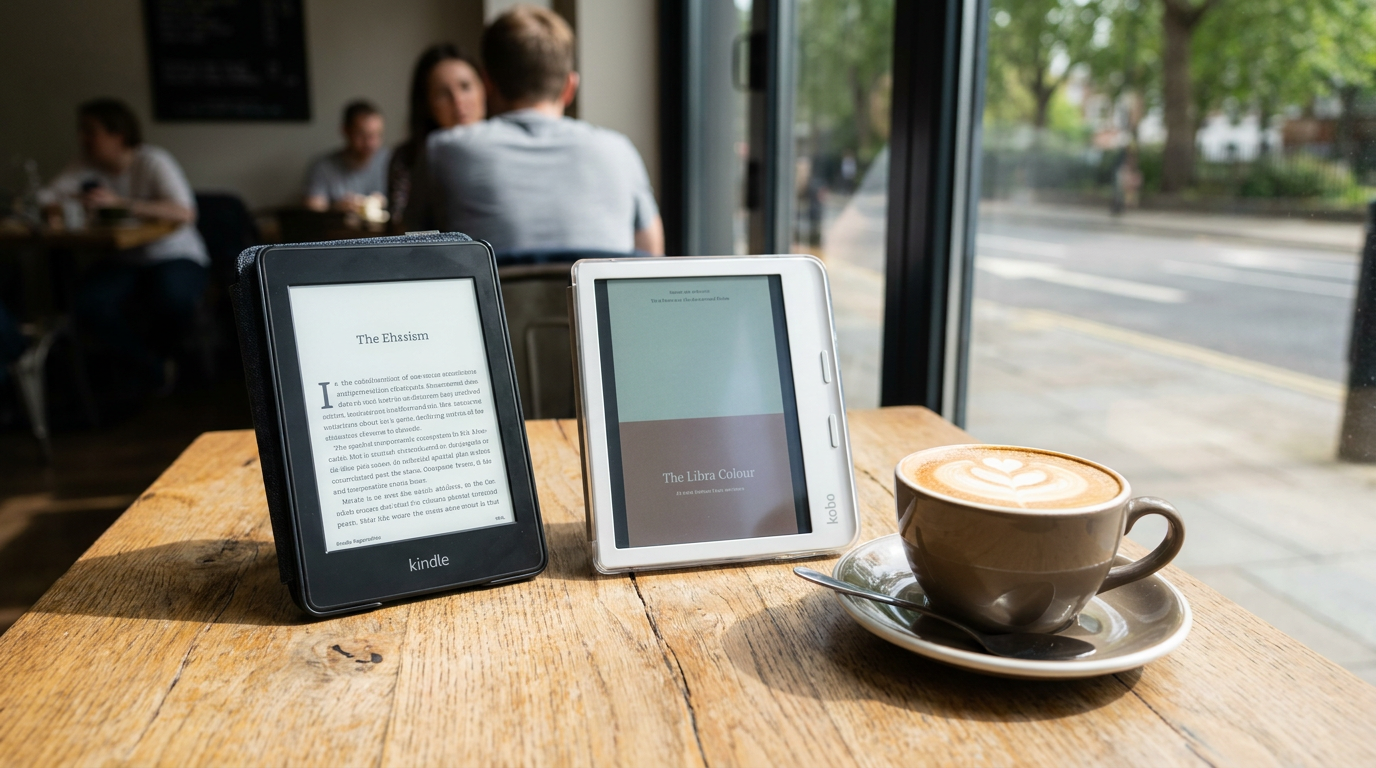
The premium e-reader market has fractured into two distinct philosophies, leaving buyers with a complex choice between the Amazon Kindle Paperwhite Signature Edition and the Kobo Libra Colour. For years, the formula for a mid-tier e-reader was simple: increase the screen size, add waterproofing, and improve the battery. Now, the landscape has shifted toward specialized features. Amazon has doubled down on raw performance and monochrome perfection with its 12th-generation Paperwhite, while Rakuten’s Kobo has introduced color E Ink and stylus support at a nearly identical price point. This divergence means that choosing the right device is no longer about finding an objective winner, but rather matching a specific hardware philosophy to personal reading habits. Reviewers across the technology spectrum agree that both devices represent the pinnacle of their respective design paths, forcing consumers to weigh the value of speed and contrast against the appeal of physical buttons and color displays.[1][2]
When evaluating the core reading experience, the display technology presents the most significant trade-off. The Kindle Paperwhite Signature Edition utilizes the latest E Ink Carta 1300 panel, delivering a 300 pixel-per-inch monochrome display that reviewers praise for its unmatched sharpness and high contrast. The background is noticeably lighter and the text darker, closely mimicking high-quality physical paper. In contrast, the Kobo Libra Colour employs an E Ink Kaleido 3 screen. While it also offers 300 pixels per inch for black-and-white text, it layers a color filter over the display to provide 150 pixel-per-inch color rendering. This added layer inherently darkens the screen slightly, reducing the stark contrast found on the Kindle. For readers who consume nothing but standard text novels, the Kindle provides a demonstrably crisper and brighter visual experience, whereas the Kobo requires slightly more reliance on its built-in front light to achieve similar legibility.[1][4][5]
Performance and navigation speed further separate the two devices, with Amazon taking a decisive lead in processing power. The latest Paperwhite Signature Edition boasts a twenty-five percent increase in page-turn speed over its predecessor, a metric that translates to instantaneous responsiveness in real-world use. Navigating menus, switching between books, and highlighting text happen without the traditional E Ink lag that users have historically accepted. The Kobo Libra Colour, while perfectly adequate for standard reading, exhibits occasional stuttering when loading large files or navigating its interface. This difference becomes particularly apparent when typing or rapidly skimming through chapters. For readers who find E Ink flashing and lag frustrating, the Kindle’s lightning-fast processor offers a remarkably smooth experience that currently stands unrivaled in the mid-tier market.[2][3]

Ergonomics and physical design present a strong argument in favor of the Kobo Libra Colour, primarily due to its asymmetrical shape and physical page-turn buttons. The device features a thicker bezel on one side, providing a natural grip for one-handed reading without obscuring the screen. The tactile feedback of physical buttons remains a highly requested feature among e-reader enthusiasts, allowing for effortless page turns without needing to swipe or tap the glass. Amazon, conversely, has maintained a symmetrical, flat-slab design for the Paperwhite. While the Signature Edition is sleek and features slightly thinner bezels, it relies entirely on touchscreen navigation. Reviewers frequently note that while the Kindle is comfortable to hold, the Kobo’s ergonomic lip and dedicated buttons make it vastly superior for prolonged reading sessions, particularly when lying down or reading with a single hand.[1][4][6]
The introduction of color on the Kobo Libra Colour dramatically alters the user interface and the experience of reading visually rich content. The Kaleido 3 screen renders book covers, comic books, and graphic novels in muted, pastel-like hues. While it lacks the vibrant saturation of an LCD or OLED tablet, the color E Ink provides a charming, newspaper-comic aesthetic that brings a new dimension to digital libraries. Highlighting text in multiple colors and viewing illustrations as the author intended adds a layer of engagement that a monochrome screen cannot match. For users who frequently read manga, cookbooks, or non-fiction titles with charts, the Kobo’s color capabilities offer a tangible benefit, even if the overall screen contrast takes a slight hit compared to the stark black-and-white clarity of the Kindle.[4][6]
The introduction of color on the Kobo Libra Colour dramatically alters the user interface and the experience of reading visually rich content.
Beyond reading, the Kobo Libra Colour introduces active note-taking capabilities, supporting the Kobo Stylus 2 for on-page annotations and dedicated digital notebooks. Users can scribble in the margins of ebooks, highlight passages in various colors, and write out thoughts just as they would in a physical paperback. However, reviewers caution that the writing experience is not flawless; there is noticeable latency compared to premium digital notepads, and the stylus is sold separately for roughly seventy dollars. The Kindle Paperwhite Signature Edition completely omits stylus support, reserving those features for the significantly larger and more expensive Kindle Scribe. Therefore, readers who view their books as interactive workspaces will find the Kobo to be a highly capable, albeit slightly laggy, companion for studying and active reading.[2][4][6]

Ecosystem flexibility remains a critical dividing line, with Kobo championing an open approach against Amazon’s walled garden. The Kobo Libra Colour features native integration with OverDrive, allowing users to browse and borrow library books directly from the device with a local library card. It also natively supports a wide array of file formats, including EPUB, CBR, and CBZ, making it incredibly easy to sideload independent ebooks and comic files. The Kindle ecosystem, while offering an unparalleled storefront and seamless synchronization across devices, requires users to convert EPUB files via the 'Send to Kindle' feature and lacks native OverDrive browsing on the device itself. For power users who source their reading material from various platforms and local libraries, the Kobo offers a level of freedom that Amazon actively resists.[1][4][5]
When evaluating battery life and premium extras, both devices offer distinct advantages that justify their price tags. The Kindle Paperwhite Signature Edition excels in longevity, boasting up to twelve weeks of battery life on a single charge, aided by its highly efficient monochrome display. It also includes wireless charging and an ambient light sensor that automatically adjusts the screen's brightness based on the surrounding environment. The Kobo Libra Colour, burdened by the power demands of its color layer and stylus digitizer, requires more frequent charging, typically lasting a few weeks depending on usage. While the Kobo lacks wireless charging, it does feature an automatic blue-light reduction system for nighttime reading. Ultimately, the Kindle provides a more hands-off, low-maintenance hardware experience.[1][3][4]
Synthesizing the evidence for and against the Kindle Paperwhite Signature Edition reveals a device built for absolute reading efficiency. The primary arguments in its favor are its class-leading text sharpness, blazing-fast processor, and the sheer convenience of the Amazon ecosystem. The evidence against it centers on its lack of physical page-turn buttons, the absence of color, and its restrictive file management system. This device fits perfectly for the pure text reader—someone who consumes standard novels, values maximum contrast for aging eyes, and wants a battery that lasts for months. It does not fit well for readers who suffer from hand fatigue and require an ergonomic grip, or those who heavily rely on local library browsing and sideloaded comic files.[2][3][5]

Conversely, the trade-off analysis for the Kobo Libra Colour highlights its versatility and tactile superiority. The strongest arguments for the Kobo are its ergonomic design with physical buttons, the engaging addition of color E Ink, and its open ecosystem with native library support. The arguments against it include a slightly darker screen background, occasional software lag, and the hidden cost of the optional stylus. The Libra Colour fits exceptionally well for library power-users, manga enthusiasts, and readers who consider physical buttons a non-negotiable requirement for comfort. It does not fit well for readers who demand the absolute highest contrast for black-and-white text, or those who are already deeply entrenched in the Kindle ecosystem and prefer not to manage third-party file conversions.[1][4][6]
How we got here
Oct 2021
Amazon releases the 11th-generation Kindle Paperwhite, establishing the 6.8-inch screen standard.
Apr 2024
Rakuten Kobo launches the Libra Colour, bringing Kaleido 3 color E Ink to the mainstream 7-inch market.
Oct 2024
Amazon unveils the 12th-generation Kindle Paperwhite Signature Edition with a faster processor and higher contrast screen.
Mid 2026
The mid-tier e-reader market solidifies into a choice between Amazon's monochrome speed and Kobo's color versatility.
Viewpoints in depth
Performance & Contrast Purists
Readers who prioritize raw speed, battery life, and the sharpest possible text.
This camp, heavily represented by mainstream tech reviewers, argues that an e-reader's primary job is to display black text on a white background as flawlessly as possible. They point to the Kindle Paperwhite Signature Edition's Carta 1300 screen and upgraded processor as the pinnacle of this philosophy. For these users, the slight darkening caused by a color layer is an unacceptable compromise, and physical buttons are deemed unnecessary when a touchscreen is highly responsive.
Versatility & Tactile Advocates
Readers who value physical ergonomics, color covers, and interactive note-taking.
This perspective argues that reading is a tactile and visual experience that Amazon's flat slabs fail to capture. They champion the Kobo Libra Colour for its asymmetrical grip and physical page-turn buttons, which significantly reduce hand fatigue. Furthermore, they view the addition of color and stylus support not as gimmicks, but as essential tools for engaging with graphic novels, highlighting non-fiction, and bringing digital libraries to life, happily accepting a slight hit to pure text contrast.
Open-Ecosystem Power Users
Readers who refuse to be locked into a single corporate storefront.
For this group, hardware specs are secondary to software freedom. They strongly advocate for Kobo devices due to their native support for a wide variety of file formats (like EPUB and CBZ) and seamless, on-device OverDrive library integration. They criticize Amazon's walled-garden approach, which forces users to rely on conversion tools and makes it difficult to manage large libraries of independently sourced or DRM-free content.
What we don't know
- Whether Amazon will eventually release a color e-reader with physical buttons to directly challenge the Libra Colour's form factor.
- How long the E Ink Kaleido 3 technology will remain the standard before a higher-contrast color display hits the consumer market.
Key terms
- E Ink Kaleido 3
- The latest generation of color electronic paper technology, capable of displaying 4,096 muted colors alongside crisp black-and-white text.
- E Ink Carta 1300
- A high-contrast monochrome electronic paper display known for its fast refresh rates and deep black text.
- OverDrive
- A digital distribution service that allows users to borrow ebooks and audiobooks directly from their local public libraries.
- Sideloading
- The process of transferring files (like ebooks or comics) directly to a device from a computer, rather than purchasing them through the device's official store.
Frequently asked
Does the color screen make regular text harder to read on the Kobo?
Yes, slightly. The color filter layer inherently darkens the screen, reducing the stark contrast found on monochrome displays like the Kindle.
Can I read my Kindle books on the Kobo Libra Colour?
Not natively. Kindle books are locked by Amazon's DRM, meaning you cannot easily transfer them to a Kobo without using third-party software to remove the protection.
Do both devices support library borrowing?
Yes, but Kobo has native OverDrive integration built into the device for direct browsing. Kindle requires you to send library books to the device via the Libby app on a phone or computer.
Is the Kobo Stylus included with the Libra Colour?
No. The Kobo Stylus 2 is sold separately for around $70, adding to the overall cost if you want to take notes.
Sources
Source coverage
6 outlets
3 viewpoints surfaced





[1]PCMagPerformance & Contrast Purists
Amazon Kindle Paperwhite Signature Edition (2024) Review
Read on PCMag →[2]TechRadarVersatility & Tactile Advocates
Kobo Libra Colour: Two-minute review
Read on TechRadar →[3]MashableVersatility & Tactile Advocates
Kindle Paperwhite Signature Edition vs Kobo Libra Colour
Read on Mashable →[4]Android AuthorityOpen-Ecosystem Power Users
Kobo Libra Colour review: Reading in color, page turning with buttons
Read on Android Authority →[5]The eBook ReaderOpen-Ecosystem Power Users
Kindle Colorsoft vs Kobo Libra Colour Comparison
Read on The eBook Reader →[6]Woman & HomeVersatility & Tactile Advocates
Kobo Libra Colour Review: The eReader that emulates the real book reading experience
Read on Woman & Home →



Every angle. Every day.
Get entertainment stories with full source coverage and perspective breakdowns delivered to your inbox.