
Google Releases Android 17: Deep AI Integration, Floating Apps, and Overhauled Multitasking
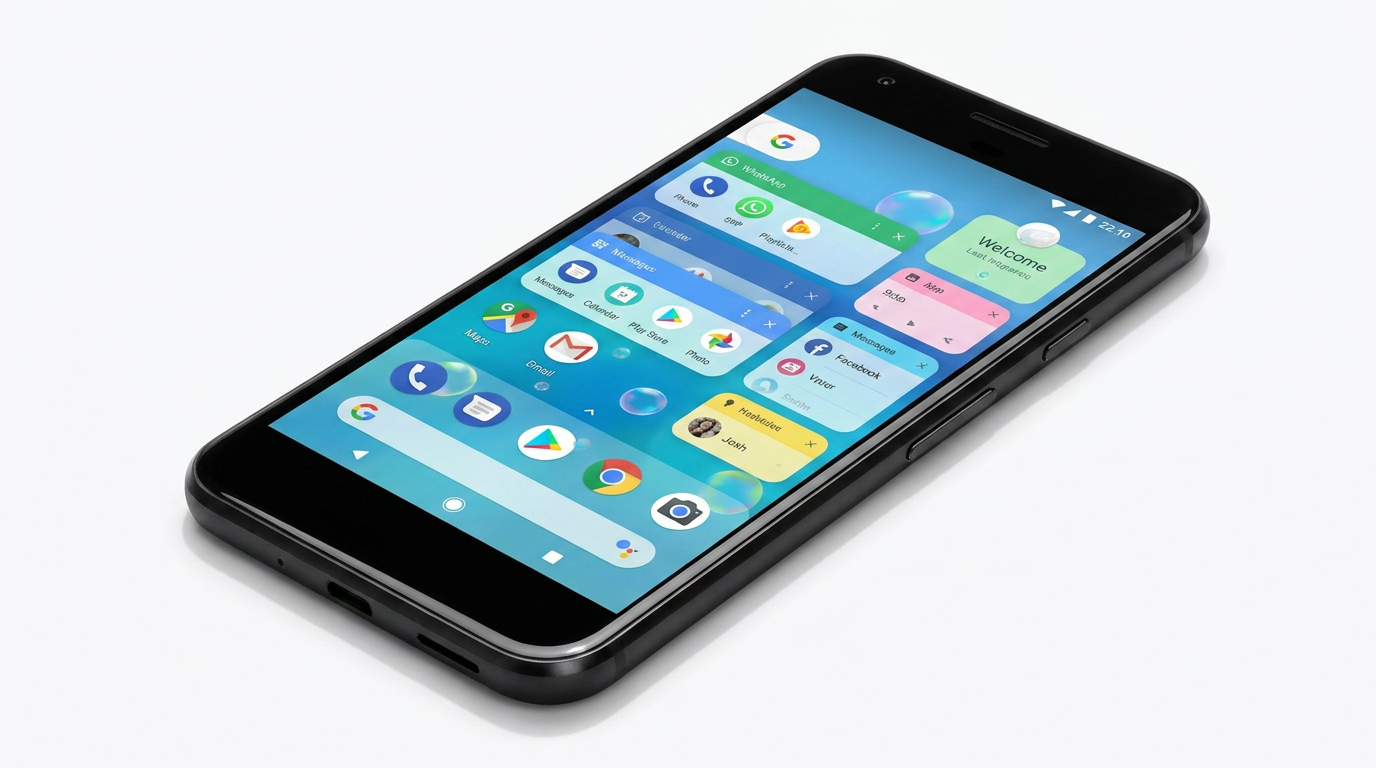
Android 17, codenamed 'Cinnamon Bun,' has officially begun rolling out to Pixel devices, bringing context-aware Gemini AI, system-wide floating 'App Bubbles,' and significant privacy upgrades.
By Factlen Editorial Team
- Everyday Consumers
- Focused on battery life improvements, smoother animations, and easier multitasking.
- Power Users & Developers
- Value the return of granular system controls, API changes, and strict memory management.
- Privacy & Security Advocates
- Emphasize the importance of session-based permissions and local network protections.
What's not represented
- · Budget Smartphone Manufacturers
- · Third-Party App Developers
Why this matters
For billions of Android users, this update fundamentally changes how they interact with their devices—automating tedious tasks, extending battery life through stricter memory limits, and making multitasking on phones and tablets significantly more powerful.
Key points
- Android 17 introduces context-aware Gemini AI that can read screens and automate tasks.
- App Bubbles allow users to turn almost any application into a floating window for easier multitasking.
- Strict background memory limits improve battery life and reduce random UI stuttering.
- New privacy pickers grant apps temporary, session-based access to sensitive data.
- Power-user features like dedicated Wi-Fi toggles and per-app dark modes have returned.
Google has officially begun the rollout of Android 17, codenamed "Cinnamon Bun," marking what industry watchers are calling the most significant overhaul to the mobile operating system in years. Released initially for eligible Pixel devices, the update represents a philosophical shift for Google, transitioning Android from a traditional operating system into a proactive "intelligence system." Rather than simply hosting applications, Android 17 is designed to anticipate user needs, automate complex multi-step tasks, and fundamentally change how users multitask on mobile screens. The rollout, which started in mid-June 2026, introduces deep integration with Google's next-generation Gemini AI, alongside a suite of highly requested power-user features and strict new privacy controls.[1][2]
At the center of the update is Gemini Intelligence, which moves well beyond standard voice commands to become a deeply context-aware assistant. Unlike previous iterations that relied on explicit prompts, the new Gemini runs underneath the OS and can "see" what is on the screen. Whether a user is looking at a complicated spreadsheet, an ambiguous photograph, or a digital form, Gemini can understand the context and take action. It can intelligently fill out forms using data from connected Google apps like Gmail and Photos, or summarize incredibly long webpages directly inside Chrome. Starting in late June, Gemini will even be able to browse across multiple open tabs to compare information and execute tasks like booking appointments on the user's behalf.[3][4]
However, the leap in artificial intelligence capabilities comes with strict hardware requirements. Google has locked the headline Gemini Intelligence features to 2026 flagship devices equipped with 12GB or more of RAM. This means that many recent premium devices, including the 2025 Pixel 9, will not qualify for the full on-device AI experience. The limitation highlights the immense computational power required to run advanced large language models locally without draining the battery or causing system lag. For users with mid-range phones or older flagships, Android 17 will still deliver the core OS upgrades, but the device will rely on standard cloud-based AI rather than the lightning-fast, privacy-preserving local processing.[2][5]

Beyond artificial intelligence, Android 17 completely reimagines mobile multitasking through a feature called "App Bubbles." Previously limited to messaging applications, the bubble API has been expanded system-wide. Users can now long-press almost any app icon on their launcher and transform it into a compact, floating window. This allows users to keep a calculator, a map, or a notepad hovering over their primary application, drastically reducing the friction of switching back and forth. On larger screens, such as tablets and foldables, the system taskbar now includes a dedicated "Bubble Bar" that holds the five most recent bubbles, allowing for seamless transitions and desktop-like window management.[1][4]
Foldable devices and tablets receive additional tailored optimizations in this release. Drawing inspiration from custom interfaces like OnePlus Open Canvas, Android 17 introduces new windowing capabilities that demand greater layout flexibility from developers. A new 90:10 split-screen ratio has been optimized specifically for foldables, allowing users to keep a primary app in focus while keeping a secondary app active in a narrow edge panel. Furthermore, a new "foldable gaming mode" maximizes screen real estate by optimizing the 50/50 layout, ensuring that controls and gameplay elements are perfectly positioned when the device is partially folded or laid flat.[1][2]
Foldable devices and tablets receive additional tailored optimizations in this release.
Content creators and heavy social media users are getting a major quality-of-life upgrade with the introduction of "Screen Reactions." This feature updates the native screen recording tool with a new floating toolbar and improved flow. More importantly, it allows users to record their device's screen and their own face via the selfie camera simultaneously. In just a few taps, users can add their thoughts and reactions over websites, apps, or trending videos without needing third-party editing software, a green screen, or complex app-switching. The resulting video is composited in real-time and ready for immediate sharing.[1][5]
Visually, Android 17 completes the rollout of the "Material 3 Expressive" design language. While early elements debuted in late 2025, the full aesthetic is now mandatory across the ecosystem. The interface features springier, physics-based motion animations that make the OS feel more natural and responsive. Google has also introduced heavier, bolder typography and new icon shapes. Crucially, the company is now enforcing mandatory auto-theming for all third-party apps. If a developer fails to supply a themed icon that matches the user's dynamic color palette, Android will automatically generate one, ensuring that holdouts like TikTok no longer disrupt a carefully curated home screen aesthetic.[2][6]

For long-time Android enthusiasts, the most celebrated changes might be the return of several highly requested power-user features. After years of complaints, Google has finally separated the Wi-Fi and Mobile Data toggles in the Quick Settings menu, allowing users to disable Wi-Fi with a single tap rather than navigating through a combined "Internet" panel. Additionally, Android 17 introduces a per-app dark theme toggle. Because system-wide forced dark modes can sometimes break the layout of older or poorly optimized apps, users can now explicitly exempt specific applications from the dark theme. For minimalists, a new setting allows users to hide app labels entirely on the home screen, letting custom icon packs shine without text clutter.[3][7]
Under the hood, Android 17 implements aggressive new memory management protocols designed to drastically improve long-term performance and battery life. Google has introduced strict background memory limits that directly target memory leaks and resource-heavy background apps. By ensuring that idle applications cannot consume excessive RAM, the OS reduces random user interface stuttering and extends standby battery time. This adaptive-first development standard forces apps to be more efficient, which is particularly vital as on-device AI processes demand an increasing share of the phone's computational resources.[1][3]
Privacy and security have also received a substantial overhaul, continuing Google's shift toward session-based permissions. Historically, apps required broad, permanent permissions to access sensitive information like contacts or precise location. Android 17 expands the use of privacy-preserving pickers, granting apps temporary, session-based access only to the specific data the user selects. For example, an app can request access to a single email address or phone number rather than the user's entire contact book. Furthermore, apps targeting the new SDK have local network access blocked by default, preventing malicious software from scanning a user's home Wi-Fi network for vulnerable smart devices.[6][7]

While Pixel owners are the first to experience Android 17, the broader ecosystem will follow in the coming months. Manufacturers like Samsung, OnePlus, and Xiaomi are expected to integrate the Cinnamon Bun update into their respective custom skins—such as One UI and OxygenOS—later in 2026. As developers update their applications to support mandatory large-screen resizability and the new AppFunctions API, the true potential of Android's transition to an intelligence system will become apparent. For now, the update stands as a robust refinement of the mobile experience, balancing cutting-edge AI automation with practical, everyday usability improvements.[2][4]
Rounding out the update are significant enhancements to media and audio handling. Android 17 enforces new restrictions on background audio interactions, preventing rogue apps from hijacking audio focus or changing volume levels unexpectedly. Additionally, the OS expands support for Bluetooth LE Audio's Auracast technology, allowing users to stream high-quality audio to multiple Bluetooth devices—such as two pairs of headphones or multiple speakers—simultaneously without complex pairing rituals. Combined with the visual and AI upgrades, these foundational improvements ensure that Android 17 delivers a polished, highly controlled media experience across all supported hardware.[6][7]
How we got here
May 2026
Google previews Android 17, codenamed 'Cinnamon Bun,' at The Android Show.
Mid-June 2026
Stable rollout begins for eligible Google Pixel devices.
Late June 2026
Advanced Gemini in Chrome features are scheduled to activate.
Late 2026
Expected rollout for major third-party manufacturers like Samsung and Xiaomi.
Viewpoints in depth
Power Users & Enthusiasts
Celebrating the return of granular system controls and customization.
For years, Android enthusiasts have criticized Google's tendency to oversimplify the interface at the expense of control. The return of dedicated Wi-Fi and mobile data toggles, along with per-app dark mode exemptions and hidden app labels, is seen as a major victory for this camp. They argue that an operating system should adapt to the user's workflow, not force a one-size-fits-all paradigm.
Privacy Advocates
Praising the shift toward session-based, temporary data access.
Privacy watchdogs have long warned about the dangers of granting apps permanent access to contacts, location, and local networks. This camp strongly supports Android 17's move to temporary, session-based permissions. By forcing apps to use system-level pickers for specific data points and blocking local network scanning by default, advocates believe Google is closing massive loopholes that data brokers and malicious actors have exploited for years.
Hardware Realists
Frustrated by the strict hardware requirements for new AI features.
While the software improvements are universally welcomed, hardware analysts and consumers who recently upgraded are voicing frustration over the 12GB RAM requirement for Gemini Intelligence. This camp points out that locking out 2025 flagships like the Pixel 9 creates premature obsolescence. They argue that while on-device AI is resource-intensive, manufacturers should offer scaled-down local models rather than forcing users to rely entirely on cloud processing or buy new hardware.
What we don't know
- Exactly when third-party manufacturers like Samsung and OnePlus will release their customized versions of Android 17.
- How significantly the new on-device Gemini AI processes will impact battery life during heavy use.
Key terms
- App Bubbles
- A multitasking feature that turns any active application into a compact, floating window on the screen.
- Gemini Intelligence
- Google's on-device artificial intelligence model that can read screen context and automate complex tasks.
- Material 3 Expressive
- Google's updated design language featuring physics-based animations, bolder typography, and dynamic color theming.
- Session-based Access
- A privacy feature where an app is granted permission to access data, like contacts or location, only for the current use rather than permanently.
Frequently asked
Will my current phone get Android 17?
Pixel 6 and newer devices are receiving the update now. Other major brands like Samsung, OnePlus, and Xiaomi will roll it out later in 2026.
Do I get the new Gemini AI features?
The advanced on-device Gemini Intelligence requires a flagship device with at least 12GB of RAM. Older or mid-range phones will rely on standard cloud-based AI.
Can I finally separate my Wi-Fi and mobile data toggles?
Yes, Android 17 brings back dedicated, single-tap Quick Settings tiles for Wi-Fi and mobile data, reversing a controversial change from previous versions.
Sources
Source coverage
7 outlets
3 viewpoints surfaced







[1]Google BlogPrivacy & Security Advocates
Android 17 is here: Multitask better with Bubbles and Gemini Intelligence
Read on Google Blog →[2]TechCabalPower Users & Developers
Android 17 'Cinnamon Bun' is the biggest Android update in years: What to know
Read on TechCabal →[3]Nokia Power UserPrivacy & Security Advocates
Why Android 17 is a massive step up: Gemini AI, Bubbles, and returning power features
Read on Nokia Power User →[4]The VergeEveryday Consumers
Android 17 arrives on Pixel: Deep Gemini integration and floating apps
Read on The Verge →[5]TechCrunchEveryday Consumers
Google rolls out Android 17 with 'App Bubbles' and context-aware AI
Read on TechCrunch →[6]Ars TechnicaPower Users & Developers
Android 17's under-the-hood changes: Strict background memory limits and privacy pickers
Read on Ars Technica →[7]WiredPrivacy & Security Advocates
Everything you need to know about Android 17's new privacy and AI features
Read on Wired →

Every angle. Every day.
Get technology stories with full source coverage and perspective breakdowns delivered to your inbox.